  • 117 Product updates
SMS Embedded Form Release Note (June 4, 2024)

SMS Embedded Form Release Note (June 4, 2024)

This update applies to customers with the SMS add-on who send messages from the UK. Under new UK regulations, you must send SMS messages from a registered UK number if you’re targeting UK recipients. We are thrilled to announce an enhancement to the SMS manager that streamlines the registration process. This update simplifies the steps needed to register your brand and obtain a UK number for sending SMS messages, providing a more seamless experience for users. What's NewA new form for SMS registration directly within the SMS manager Key ImprovementsUsers can now complete the Know Your Customer (KYC) compliance registration directly within the app. ActiveCampaign will submit this information on behalf of our customers to automate the KYC verification process.  Track your progress through a status tracker located in the SMS manager. Benefits Streamlined accessibility that saves time, reduces friction, and enhances the overall experience. Registrations that are approved and sent from a local number will experience enhanced deliverability and engagement. This is due to the newly assigned UK numbers being deemed more trustworthy, thereby increasing the likelihood of message delivery to the intended recipient.  Upgrade and/or Setup InstructionsTo access this feature, users will need SMS add-on.  Complete registration by September 30, 2024, to avoid any disruption in your messaging services. Once approved, you will receive a new local number to update the areas needed in your marketing assets. We'll automatically update your SMS automations and subscriptions with the new number for a seamless transition. Additional ResourcesAbout SMS UK Regulation Updates Getting Started with SMS in ActiveCampaign

Related products:SMS marketing
WhatsApp integration with ActiveCampaign via Spoki (May 10, 2024)

WhatsApp integration with ActiveCampaign via Spoki (May 10, 2024)

We’re excited to announce our new WhatsApp integration via Spoki, the leading WhatsApp and conversational marketing platform. This integration taps into the power of WhatsApp and marketing automations to revolutionize the way you engage with your audience across channels, creating personal 1:1 experiences at scale. Available in North America and Europe. Key Features Seamlessly connect Spoki WhatsApp automations with ActiveCampaign automations Add Spoki steps in ActiveCampaign automation to send automatic WhatsApp messages, update WhatsApp Contact in Spoki, and start Spoki WhatsApp automation. On the other hand, add ActiveCampaign steps in Spoki automation to start an ActiveCampaign automation when an event happens in Spoki WhatsApp chat embedded directly in ActiveCampaign Effortlessly manage conversations and view all the information within your Contact record and Deal record, streamlining communication and boosting productivity. View customers’ Spoki WhatsApp activities in ActiveCampaign Track and view all events or activities triggered by Spoki Whatsapp automations in the Spoki Custom Object or activity timeline of the Contact record in ActiveCampaign  Benefits Boost lead generation and engagement Capture leads via WhatsApp with UTM tracking, automatically send personalized welcome messages to nurture and drive conversations. Accurately track lead sources and channel effectiveness to optimize marketing strategies in real-time. Enhance sales and conversions Reach your customers where they are by seamlessly integrating timely email communication and WhatsApp messages to embrace an omnichannel approach. Send targeted campaigns based on customers past interests, abandoned cart, or purchases and offer exclusives to enhance sales and conversions. Improve operational efficiency Automate reminders that are sent to customers in advance via WhatsApp to review the appointment and update the calendar to reduce no-shows.  Setup InstructionsThis integration is available to all ActiveCampaign customers in North America and Europe regions.Connect WhatsApp by Spoki to ActiveCampaign WhatsApp by Spoki integration FAQs Use WhatsApp by Spoki to send messages with ActiveCampaign automationAdditional ResourcesWatch a demo Learn more about the Spoki integration with ActiveCampaign 3 ways to improve your company performance with Spoki integration with ActiveCampaign Access the integration via Spoki

Related products:IntegrationsWhatsApp
Zendesk Support Integration Update (May 9, 2024)
View SMS in contact record and activity stream (May 1, 2024)
LinkedIn Ads Integration with ActiveCampaign (April 30, 2024)

LinkedIn Ads Integration with ActiveCampaign (April 30, 2024)

We are excited to announce the release of LinkedIn Ads, now available for customers on Marketing Plus+, Sales Professional+, and Marketing + Sales Plus+. This new feature enhances the functionality of our product, providing users with a direct connection to their LinkedIn Lead Gen Forms. Create and update contacts directly when a new form is submitted, registering someone for an event or Key Features Sync contacts directly to ActiveCampaign when they submit a Sponsored or Organic Lead Form on LinkedIn Trigger automation workflows when a new form is submitted or a form is updated Track engagement on the contact record with custom objects for each form submitted  BenefitsDeliver tailored follow-up experiences Utilize captured information from LinkedIn to deploy personalized messages, ensuring every interaction resonates with your audience. Seamlessly manage your leads within ActiveCampaign Organize, segment, and prioritize leads to optimize your marketing strategies effectively. Better understand your audience and tailor your messaging for maximum engagement. Leverage ActiveCampaign's powerful automation capabilities Trigger personalized workflows based on lead actions, nurturing prospects through every stage of the customer journey. Setup InstructionsHow to connect LinkedIn lead gen forms to ActiveCampaign Additional ResourcesMore information on the LinkedIn Ads integration

Calendly Integration Update (April 23, 2024)
Recurring Payments for WooCommerce & PayPal (April 11, 2024)

Recurring Payments for WooCommerce & PayPal (April 11, 2024)

We are excited to announce the release of Recurring Payments, now available for WooCommerce and PayPal. This new feature enables subscription businesses to deliver superior customer experiences needed to foster loyalty, increase retention rates, and drive sustainable growth. By automating tasks, personalizing communication, and proactively addressing customer needs–businesses can create seamless and engaging subscription journeys that keep customers satisfied and coming back for more. Key Features Dedicated triggers to manage communications Head to Automations and find ‘Recurring Payments Created’ and ‘Recurring Payments Updated’ triggers to build automations that manage subscription-related interactions. Contact details for streamlining customer service Head over to 'Contacts' to access details about your customers' recurring payments and orders, that facilitates seamless customer success. Segmentation for personalized and targeted marketing efforts Leverage the segment builder to categorize your customer base into specific groups according to factors like subscription tier and past purchase behavior.   Benefits Maximize customer engagement throughout the subscription journey Sets up automated email campaigns to engage customers at pivotal moments throughout their subscription journey, starting with a welcome email to nurture their loyalty. Boost revenue with automated cross and upsell campaigns With the help of our intelligent Product Recommendations feature, create strategic email campaigns that recommend complementary products or enticing upgrades. Eliminate payment failures with automated reminders Notify subscribers via email if their payment fails, offering assistance in updating payment information or resolving billing issues.  Use CasesWelcome Sequence to New Recurring Payments Customer Content Digest for Recurring Payments Customer Win-Back Email for Recurring Payments Customer Product Recommendation for Recurring Payments Customer Payment Failed for Recurring Payments Customer Setup InstructionsGet Started with Recurring Payments for PayPal Get Started with Recurring Payments for WooCommerce Additional ResourcesWatch the Demo How to Get Started With a Subscription Business in 8 Steps 4 Email Marketing Automations Needed for Subscription Business Model Growth How to Master Customer Retention for Your Subscription Business with Marketing Automations

Related products:IntegrationsEcommerce integrations
Unbounce Integration Update (April 3, 2024)
Calendly Integration Update: Event Types (April 3, 2024)
Typeform Integration Update (March 27, 2024)
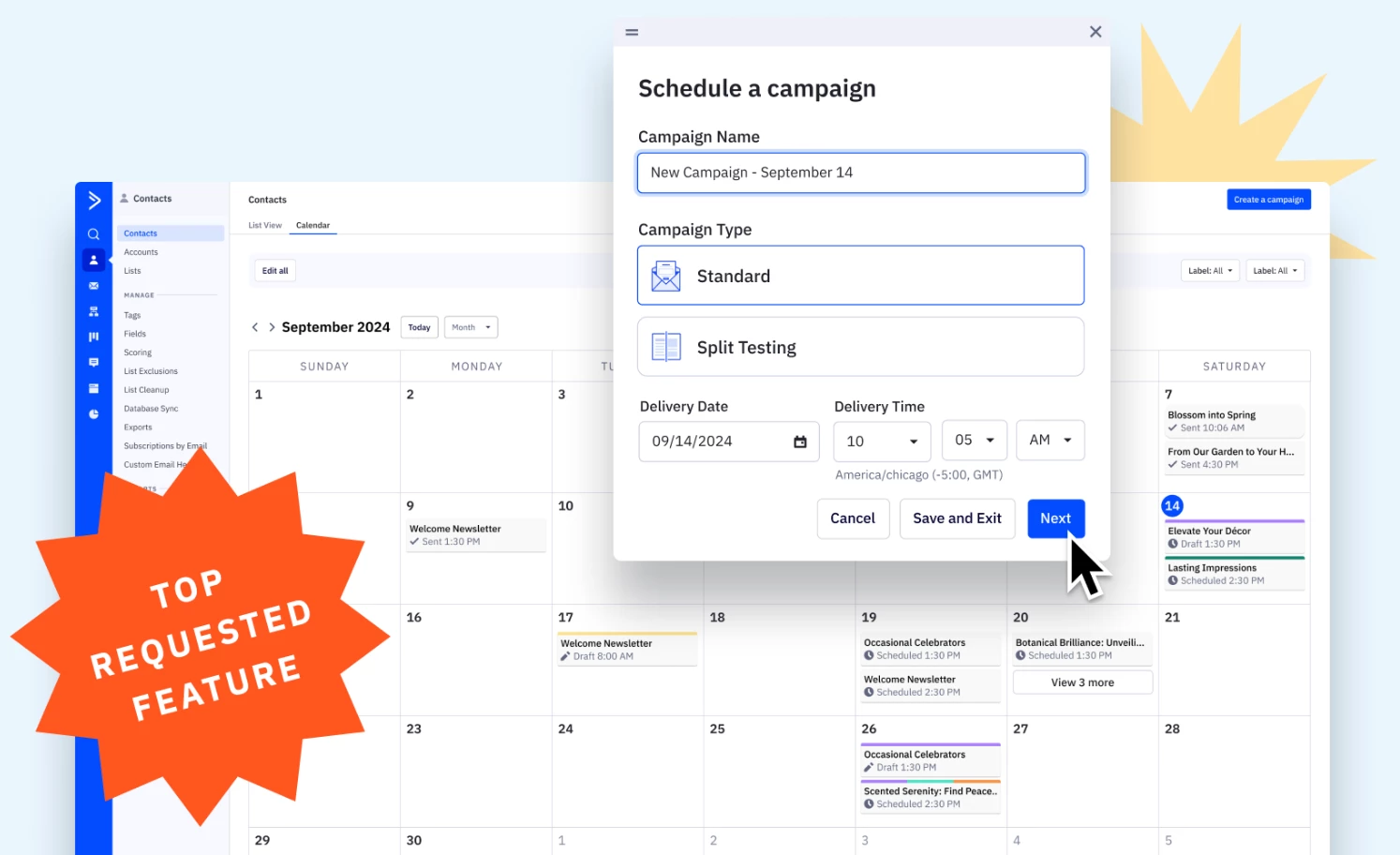
Download and print Campaigns (March 20, 2024)
Google Sheets Integration Update (February 28, 2024)
Automations Unsubscribe Management (February 15, 2024)
New fonts and text options for Forms (February 1, 2024)

New fonts and text options for Forms (February 1, 2024)

We've enhanced the forms builder to offer greater customization options, allowing you to align your forms seamlessly with your brand for a more cohesive customer experience. Key Features 1500 fonts to design and match your brand More control with text style and size Customizable color picker for a personalized touch Enhanced borders and padding options for precise design Benefits Build forms for a cohesive brand experience With 1500 fonts and customizable color options, users can align their forms seamlessly with their brand's visual identity, ensuring a consistent and professional look across all customer touchpoints. This consistency reinforces brand recognition and trust, contributing to a more cohesive customer experience. Enhanced design control More control over text style, size, borders, and padding options empowers users to create visually appealing and user-friendly forms. This level of customization not only enhances the aesthetics but also improves readability and usability, leading to higher engagement and conversion rates. Personalization and customization opportunities By optimizing forms with brand style, fonts, and actionable copy, users can effectively capture leads and drive conversions. Customized forms that resonate with the target audience's preferences and expectations are more likely to elicit positive responses and prompt users to take desired actions.  Setup InstructionsHow to create a Form in ActiveCampaign

Related products:Forms
Authenticate and purchase domains in Advanced Settings (February 1, 2024)

Authenticate and purchase domains in Advanced Settings (February 1, 2024)

In February 2024, Google and Yahoo rolled out new email authentication requirements. At a minimum, Google and Yahoo are mandating the following compliance measures:Set up DKIM and DMARC for all sending domains. Purchase domains through a preferred DNS provider if you currently send from an @gmail.com address.These changes apply to all senders, with a more pronounced impact on deliverability for bulk senders. To ensure you maintain compliance with these email deliverability standards we’ve introduced the ability to purchase and authenticate your domains in the platform in a matter of minutes. Additionally, we’ve made custom mail server domains available on all plan tiers, free of charge.  Key Features Set up DKIM and DMARC authentication for all sending domains Head to Advanced Settings to authenticate your existing domain. Note, permission is only available to account administrators. Purchase a new domain in minutes  Don’t have a domain? Head over to Advanced Settings to purchase one through a direct integration with Ionos, a preferred DNS provider. Once you go through the check out process, your domain will be fully authenticated.   Custom mail server domains available on all plan tiers Setting up custom mail server domains happens automatically during the authentication process in Advanced Settings.  Benefits Gain control of your email infrastructure You can now effortlessly purchase and authenticate all your domains directly within the platform in minutes. Gain control of your email infrastructure with custom mail server domains for branding, credibility, and consistency. Enhanced deliverability Authentication provides a robust shield against potential phishing attacks and ensures that your emails land securely in your recipients' inboxes. Build trust and credibility Authentication signals to email service providers and recipients that your emails are legitimate, fostering trust and enhancing your brand's credibility. Optimize sender reputation By authenticating your email domains, you actively contribute to building and maintaining a positive sender reputation, a critical factor influencing deliverability rates.  Setup InstructionsSet up your sending domain Buying a sending domain Additional ResourcesWatch the Demo How to warm up a new sending domain Guide to Google and Yahoo authentication changes Learn more about custom mail server domains

New Campaign workflow (January 24, 2024)

New Campaign workflow (January 24, 2024)

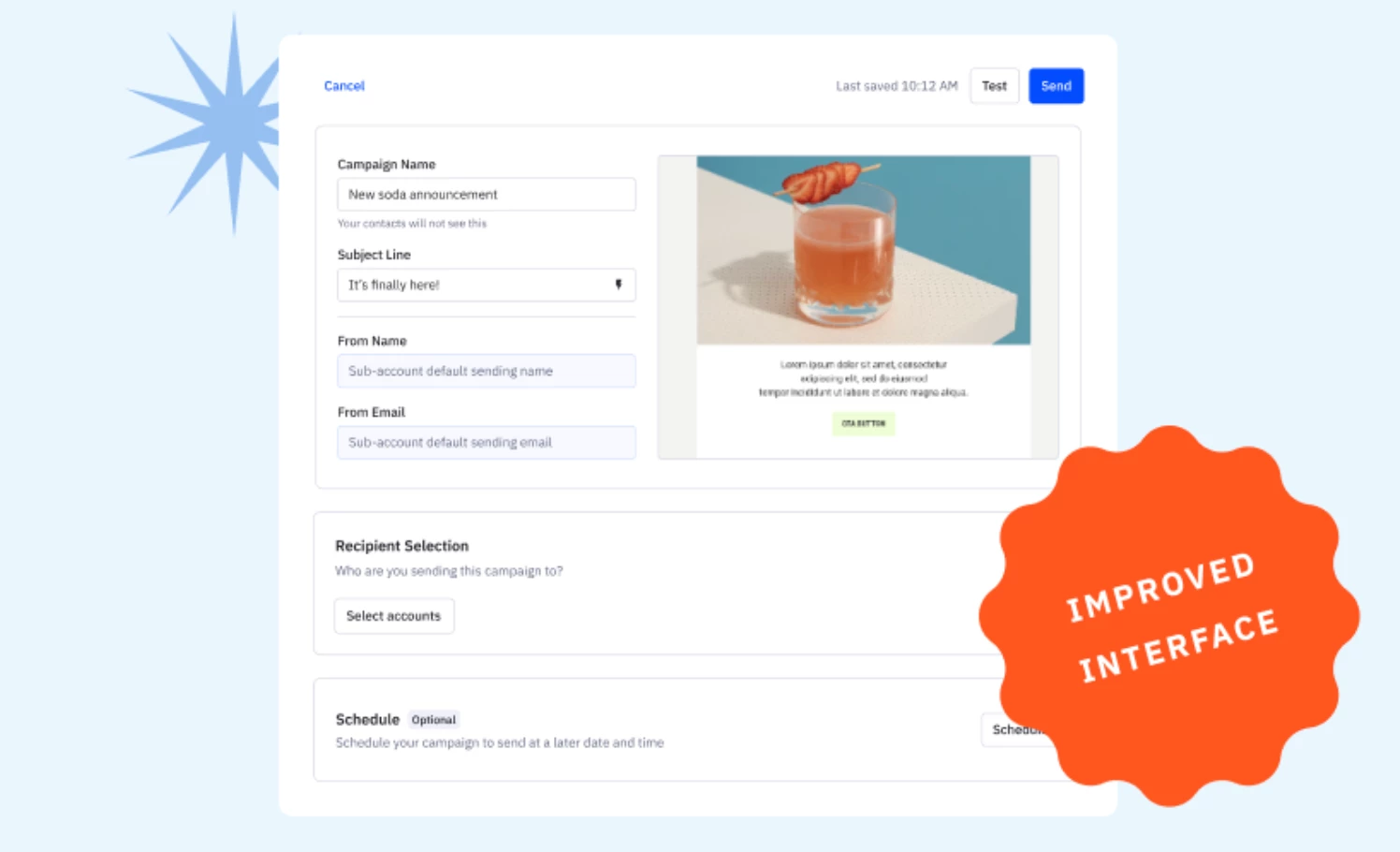
We’ve enhanced the email set up experience in the platform so you can easily set up an email, kick-off an automation, and send to your targeted audience- all in one place! Key Features Fewer required fields Start by entering your subject line and from name, and then select a list/segment for recipients. You can always revisit to edit or update as needed. Centralized access to lists and settings Access lists and settings in this single, centralized location, eliminating the time needed to adjust in different steps. Flexibility to jump into content or design Start on the campaign workflow page or select the email template preview box to experiment with designs and refine your email message.  Benefits Streamline marketing efficiency to focus on things that matter By consolidating email set up, automation initiation, and audience targeting into one platform, users can complete their tasks more efficiently without navigating between multiple interfaces. Reduce time to value with centralized control Providing centralized access to lists and settings means users have everything they need at their fingertips, minimizing the time spent searching for specific tools or settings scattered across different menus. Improved user experience to allow flexibility The flexibility to seamlessly transition between content creation and design empowers users to focus on what matters most: crafting compelling emails that resonate with their audience, without getting bogged down by technical barriers or interface limitations.  Additional ResourcesWatch the Demo How to create and send a campaign

Related products:Campaigns