
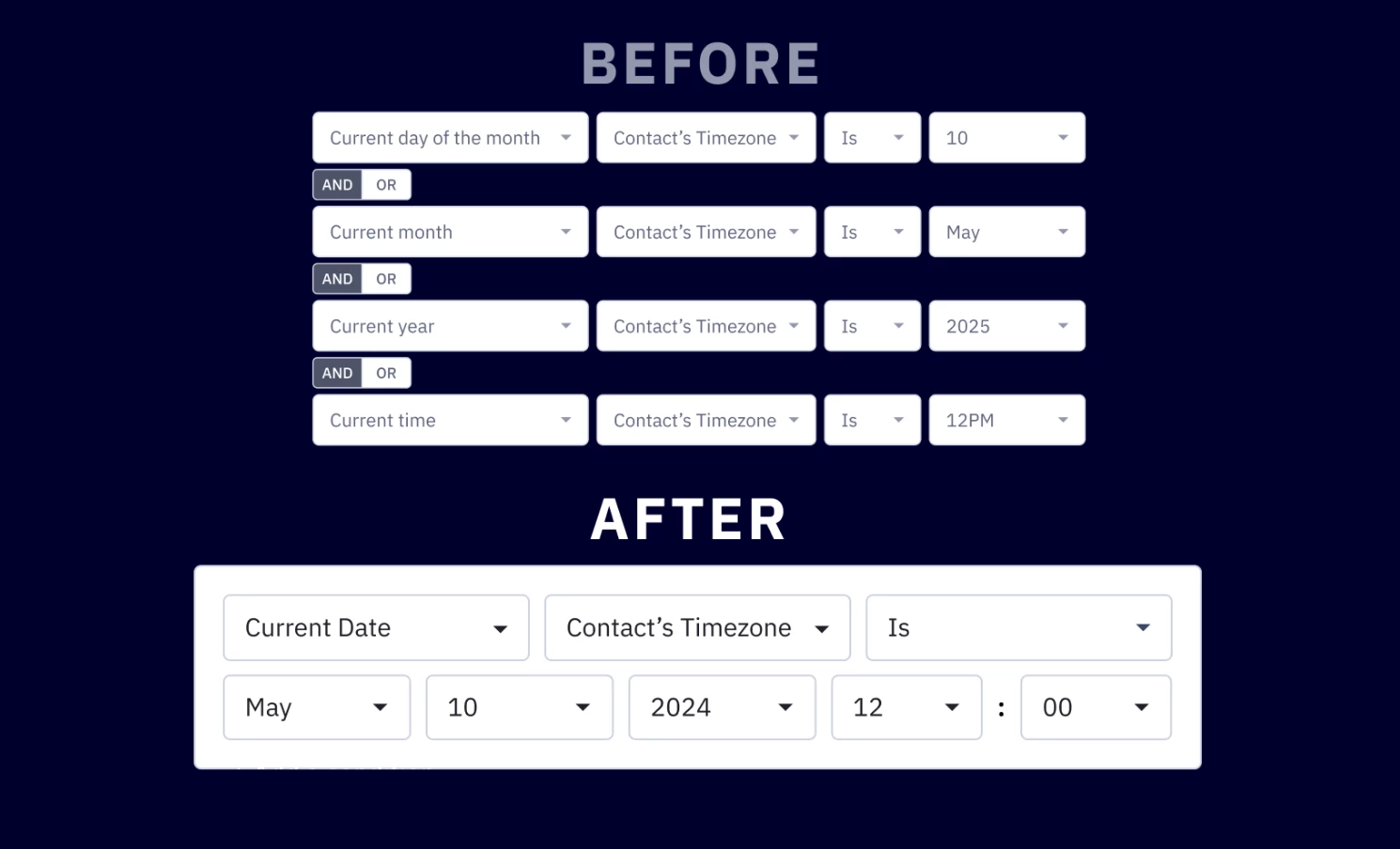


We are excited to announce a highly requested update to the Date/Time condition in the segmentation builder. This update provides greater flexibility and control which makes it easier to fine-tune the timing of your workflows. This is going to be rolled out to accounts this week.
Key Improvements
- Unified date/time condition selection
Expanded date/ time range with timezone, month, date, year, and time all in one place when you need to set your conditions.
- Improve usability
New interface that allows you to streamline date-based conditions, making it easier to set up automations.
Benefits
- Greater flexibility
Support more complex date/time configurations, allowing you to build highly customized workflows. - Time-saving and error-reducing
Reduces setup time and eliminates room for errors associated with the old date/time conditions.
Upgrade and Setup Instructions
For existing automations
- No actions required
Your current automations using existing wait time conditions and logic will remain unchanged and continue working as they do today.
- Optional updates
If you would like to leverage the new conditions, you can manually update your existing automations.
For new automations
- Simply use the updated Date/Time condition builder to configure your automation workflows date/time.
Additional Resources
• How to set date/time conditions for automations to trigger or wait until a specific date/time?